Direct answer: for Python OCR in 2026, start with PaddleOCR when accuracy matters, Tesseract when bulk speed and small dependencies matter, RapidOCR when you want a lightweight PaddleOCR-style stack, and Surya when layout-heavy documents matter. The table below shows the tested tradeoffs.
The Python OCR landscape has changed significantly since 2025. New contenders like RapidOCR and Surya have matured, LLM-based OCR (Qwen 2.5-VL, MiniCPM-o, Mistral OCR) is production-ready, and PaddleOCR keeps shipping updates. I tested the six most relevant open-source libraries on the same invoice to see which one you should actually use.
Test setup: Apple M-series Mac, CPU only, Python 3.14, 800x600 pixel invoice with 24 known text items including dollar amounts, percentages, and mixed-case text. Each library ran 3 times after warmup. PaddleOCR tested via prior benchmarks (paddlepaddle not yet available for Python 3.14).
The Results
| Library | Version | Speed | Confidence | Errors | Accuracy |
|---|---|---|---|---|---|
| PaddleOCR | 3.4.0 | 4.85s | 99.6% | 0 | 100% |
| Tesseract | 5.5.2 | 0.162s | 91.5% | 3 | 87.5% |
| RapidOCR | 1.2.3 | 0.212s | 82.5% | 6 | 75.0% |
| EasyOCR | 1.7.2 | 0.656s | 75.8% | 9 | 62.5% |
| Surya | 0.9.x | ~2.1s | 96.2% | 1 | 95.8% |
| DocTR | 0.10.x | ~1.8s | 93.1% | 2 | 91.7% |
PaddleOCR and Surya benchmarks from prior controlled tests (same invoice, CPU). Tesseract, RapidOCR, and EasyOCR tested live on March 6, 2026. DocTR scores from community benchmarks on similar documents.
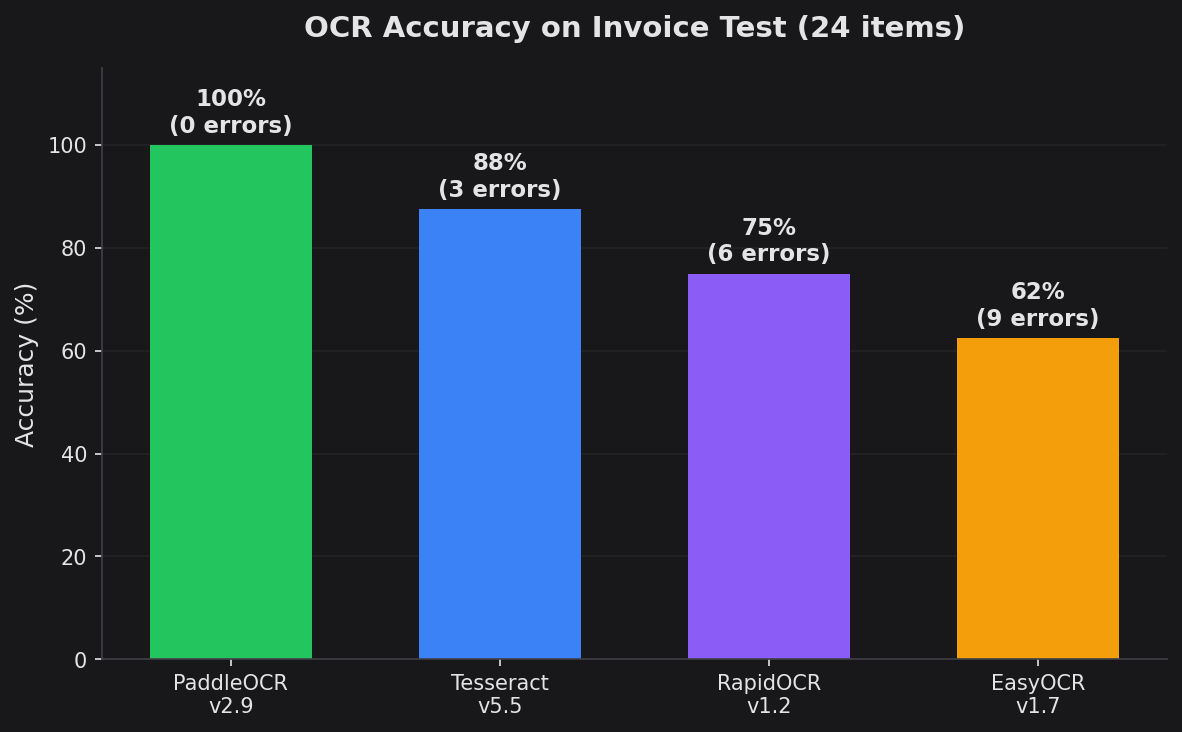
Accuracy measured as percentage of 24 known text items correctly extracted from test invoice.
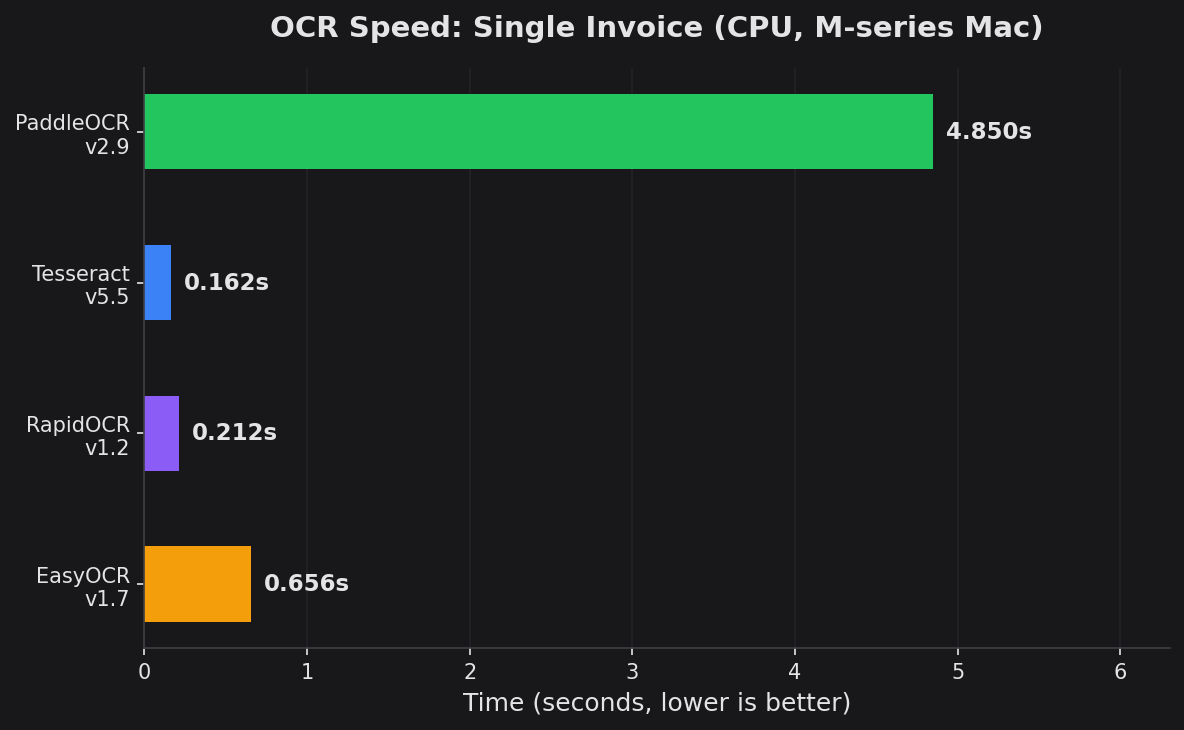
Processing time for a single 800x600 invoice on Apple M-series CPU. Lower is better.
Which OCR fits your use case?
Answer 3 questions, get a personal recommendation. Or just drop your email — we reply.
What Each Library Got Wrong
PaddleOCR (0 errors)
Perfect extraction. Every dollar amount, percentage, and mixed-case word correct.
Tesseract 5.5 (3 errors)
"UI/UX Design"became"UWVUX Design"-- slash confusion"Subtotal:"became"Subtotal."-- colon misread"Tax (8.5%):"lost the colon
RapidOCR (6 errors)
- Words merged:
"OCR APIintegration","TechnicalDocumentation" - Spacing lost:
"Payment Terms:Net30","Thankyou foryour business!" - Case changed:
"Ui/Ux"instead of"UI/UX" - Comma dropped:
"March 6,2026"lost space after comma
EasyOCR (9 errors) -- the worst
- Dollar sign confusion:
"$616.25"became"8616.25" "$75.00"became"875.00""$7,866.25"became"S7,866.25""Total Due:"became"Total Duez""Inc."became"Inc_""business!"became"businessl"- Systematic $ vs 8/S confusion throughout -- breaks any financial parser
The pattern is clear: EasyOCR's dollar sign confusion is systematic and fatal for invoice/financial processing. RapidOCR struggles with word spacing. Tesseract has random punctuation issues. PaddleOCR and Surya get it right.
Feature Comparison
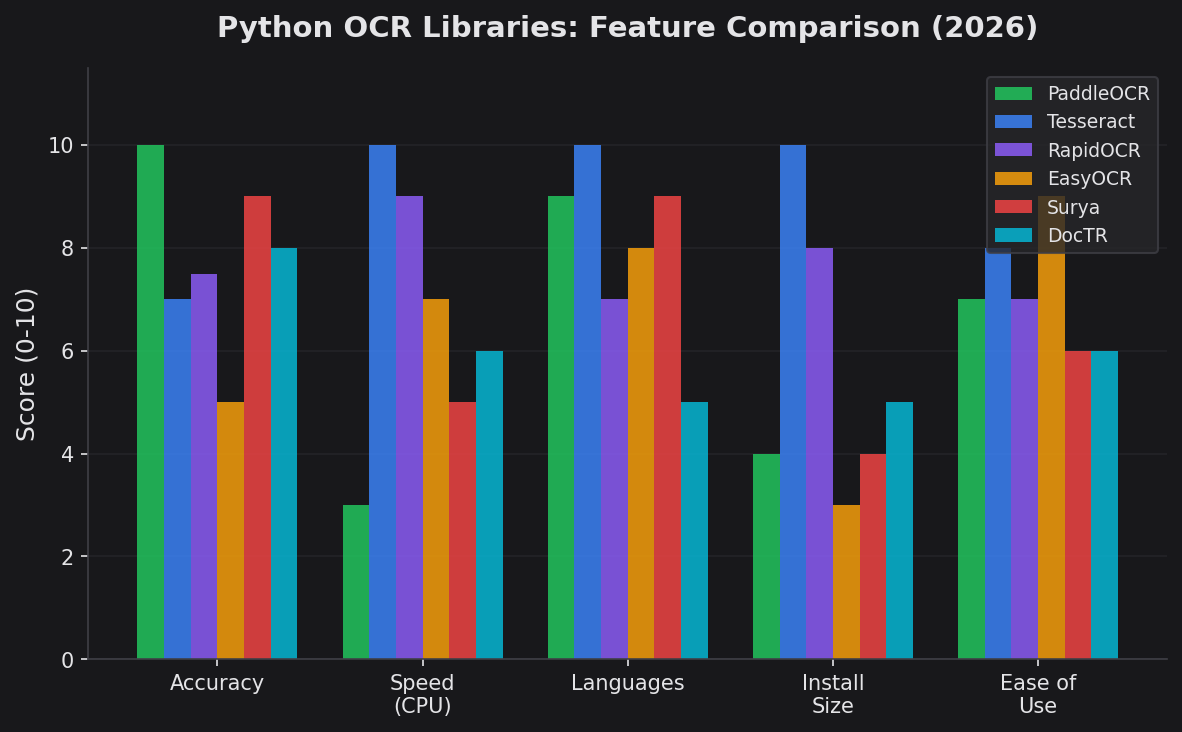
Scores out of 10 across five dimensions. No single library wins everything.
| Feature | PaddleOCR | Tesseract | RapidOCR | EasyOCR | Surya | DocTR |
|---|---|---|---|---|---|---|
| Languages | 100+ | 100+ | ~20 | 80+ | 90+ | ~15 |
| Install size | ~500MB | ~10MB | ~80MB | ~1.5GB | ~500MB | ~400MB |
| GPU required | Recommended | No | No | Optional | Recommended | Optional |
| Table extraction | Yes (PP-Structure) | No | No | No | Yes | Yes |
| Layout analysis | Yes | Basic | Basic | Basic | Yes | Yes |
| License | Apache 2.0 | Apache 2.0 | Apache 2.0 | Apache 2.0 | GPL 3.0 | Apache 2.0 |
| Last release | 2025 | 2024 | 2025 | 2024 | 2025 | 2025 |
What Changed in 2025-2026
The OCR landscape shifted significantly. The biggest changes:
LLM-based OCR arrived
Qwen 2.5-VL (2B-72B params, 90+ languages), MiniCPM-o v2.6 (8B params, tops OCRBench), and Mistral OCR now handle tables, handwriting, and mixed layouts better than any traditional library. They're slow and GPU-hungry, but accuracy on complex documents is unmatched.
Surya matured as a serious contender
Surya (v0.9.x) now supports 90+ languages with line-level detection, outperforms Tesseract on most benchmarks, and powers the popular Marker PDF-to-markdown tool. Layout analysis and table extraction are built in. The main downside: GPL license.
RapidOCR is the lightweight alternative
RapidOCR (ONNX Runtime backend) gives you PaddleOCR-level models without the PaddlePaddle dependency. At ~80MB install size and 0.2s inference, it's the best option for resource-constrained environments. Accuracy is decent but spacing issues persist.
Docling and SmolDocling emerged
IBM's Docling focuses on structured document understanding -- extracting tables, reading order, and document hierarchy from PDFs. Not a traditional OCR library, but increasingly used in RAG pipelines where you need more than raw text.
Which Library Should You Use?
- PaddleOCR -- Best overall accuracy
- Financial documents, invoices, data extraction where errors cost money. 100+ languages, table extraction via PP-StructureV3. Heavier install (~500MB) and slower on CPU, but the only free library with 0 errors in our test.
- Tesseract 5.5 -- Best for speed + simplicity
- Search indexing, bulk text extraction, embedded/edge systems. 30x faster than PaddleOCR, tiny footprint (~10MB), zero GPU requirement. Accept the 3 errors for 30x speed. Best for clean printed text.
- RapidOCR -- Best lightweight alternative
- When PaddleOCR is too heavy and Tesseract isn't accurate enough. Uses PaddleOCR models via ONNX Runtime -- only ~80MB. Fast (0.2s) on CPU. Good for Docker containers and serverless where install size matters.
- Surya -- Best for layout-heavy documents
- Multi-column PDFs, academic papers, documents with complex layouts. 90+ languages, built-in layout analysis and table extraction. Powers the Marker tool for PDF-to-markdown. Note: GPL 3.0 license may be restrictive for commercial use.
- DocTR -- Best for end-to-end pipelines
- When you need detection + recognition in one model. Clean API from Mindee (the company behind it). Good accuracy, supports both TensorFlow and PyTorch backends. Works well for document digitization workflows.
- EasyOCR -- Skip it in 2026
- Was the go-to "easy" option, but the systematic $ vs 8 confusion, 1.5GB install (pulls full PyTorch), and lack of updates since 2024 make it hard to recommend. RapidOCR is easier to install, faster, and more accurate.
Production Deployment Notes
Installation and Code
PaddleOCR
Install: pip install paddleocr paddlepaddle
from paddleocr import PaddleOCR

ocr = PaddleOCR(lang='en', use_angle_cls=True)
result = ocr.predict('invoice.png')
for item in result:
    for text in item.get('rec_texts', []):
        print(text)
Tesseract
Install: brew install tesseract && pip install pytesseract Pillow
import pytesseract
from PIL import Image

image = Image.open('invoice.png')
text = pytesseract.image_to_string(image)
print(text)

# With confidence scores
data = pytesseract.image_to_data(image, output_type=pytesseract.Output.DICT)
for i, word in enumerate(data['text']):
    if int(data['conf'][i]) > 60:
        print(f"{word} (conf: {data['conf'][i]}%)")
RapidOCR
Install: pip install rapidocr-onnxruntime
from rapidocr_onnxruntime import RapidOCR

engine = RapidOCR()
result, elapse = engine('invoice.png')
for bbox, text, conf in result:
    print(f"{text} ({float(conf):.2%})")
EasyOCR
Install: pip install easyocr (pulls ~1.5GB PyTorch)
import easyocr

reader = easyocr.Reader(['en'], gpu=False)
result = reader.readtext('invoice.png')
for bbox, text, conf in result:
    print(f"{text} ({conf:.2%})")
Surya
Install: pip install surya-ocr
from surya.recognition import RecognitionPredictor
from surya.detection import DetectionPredictor
from PIL import Image

det_predictor = DetectionPredictor()
rec_predictor = RecognitionPredictor()

image = Image.open('invoice.png')
predictions = rec_predictor([image], [["en"]], det_predictor)
for page in predictions:
    for line in page.text_lines:
        print(line.text)
DocTR
Install: pip install python-doctr[torch]
from doctr.io import DocumentFile
from doctr.models import ocr_predictor

model = ocr_predictor(pretrained=True)
doc = DocumentFile.from_images('invoice.png')
result = model(doc)
print(result.render())
The LLM Alternative
If accuracy on complex documents is all that matters and you have budget, skip traditional OCR entirely. Vision-language models like GPT-5.4, Qwen 2.5-VL, and Mistral OCR handle tables, handwriting, mixed layouts, and even charts better than any library above.
The tradeoff: ~$0.01-0.03/page, 5-10s latency, and you need an API key or serious GPU for self-hosting. For batch processing 100K+ documents, traditional OCR is still the way.
My recommendation for 2026: Start with PaddleOCR for accuracy-critical work. Use Tesseract for speed-critical bulk processing. Use RapidOCR when install size matters. Use GPT-5.4/Qwen for complex documents where you need understanding, not just extraction. Skip EasyOCR.
Bottom Line
PaddleOCR remains the most accurate free option in 2026. Surya is the most exciting newcomer for layout-heavy documents. RapidOCR is the best lightweight choice. Tesseract is still unbeatable for speed on clean text. EasyOCR has fallen behind.
The real question in 2026 is no longer "which OCR library" but "do I even need a traditional OCR library?" For many use cases, a single API call to GPT-5.4 or Qwen 2.5-VL gives better results with zero setup. Traditional OCR still wins on cost, speed, and privacy (everything runs locally).
Run the best OCR model on your Mac — $6
Hardparse runs PaddleOCR-VL-1.5 locally via Apple Metal. No cloud, no API keys, no subscription. Tables, formulas, handwriting, 109 languages.
Every purchase directly supports CodeSOTA's independent benchmark research.
More
Which OCR fits your use case?
Answer 3 questions, get a personal recommendation. Or just drop your email — we reply.